Updated September 2026
Learn how HubSpot's AEO tool enhances visibility in AI searches and learn to optimize your brand for the evolving landscape of search behavior.
If you’ve noticed more people searching with tools like ChatGPT, Gemini, and Perplexity instead of traditional Google searches, you’re not imagining it. Search behavior is changing fast — and that’s where AEO comes in.
AEO stands for Answer Engine Optimization. Instead of optimizing your website just for search engines, AEO focuses on helping your brand show up in AI-generated answers.
AEO vs. GEO: What's the Difference?
As this space evolves, you'll hear two terms used interchangeably: AEO (Answer Engine Optimization) and GEO (Generative Engine Optimization). While AEO focuses on optimizing for direct, single-answer queries across conversational assistants, GEO refers to broader visibility strategies across generative AI search experiences (like Google AI Overviews, Perplexity, Claude, ChatGPT, and Gemini). HubSpot’s AEO tool suite covers both.
The big change is:
Instead of asking Google and clicking links, people are increasingly asking AI tools direct questions and getting recommendations instantly.
And if your business isn’t part of those answers? Your competitors probably are.
So… What Does HubSpot AEO Actually Do?
Tracking your AI visibility score is only half the battle; fixing the gaps requires structural changes to your content. HubSpot integrates AEO tracking directly with Content Hub to help you execute recommendations:
- Auto-Generated Schema Markup: HubSpot pages now automatically structure JSON-LD schema (FAQ, How-To, Article, and Product data) so LLMs can easily parse, index, and cite your core entity data.
- Content Remediation Workflows: When the AEO Recommendations tab identifies a missing prompt or citation gap, you can generate a Content Hub blog draft or knowledge base entry directly from the suggestion with one click.
- Brand Authority & Dark Social Tracking: AEO relies heavily on off-page citations. Content Hub helps monitor brand mentions, referral traffic from AI engines, and dark social sharing across unlinked channels.
HubSpot AEO helps businesses understand how visible they are across AI platforms like ChatGPT, Gemini, and Perplexity.
The tool includes:
- AI visibility scoring
- Prompt tracking
- Citation analysis
- Competitor comparisons
- Actionable recommendations for improving visibility
HubSpot describes it as a way to “see exactly how your business shows up in AI answers.”
One of the most interesting parts is the visibility score, which measures how often your brand appears in AI-generated responses and how those mentions are framed.
How HubSpot Users Can Access It
HubSpot currently offers a few different ways to explore AEO:
Try the Free AEO Grader
If you just want a snapshot of how your brand is performing in AI search, start with HubSpot’s free grader tool:
The grader looks at things like:
- Brand recognition
- Share of voice
- Sentiment
- Citation quality
- AI visibility across major platforms
It’s a really easy way to benchmark where you stand right now.
Use the Full HubSpot AEO Tool
HubSpot Users on Marketing Hub Professional or Enterprise automatically get HubSpot AEO with their subscription.
For users not on Marketing Hub Professional or Enterprise, don't worry - HubSpot has thought of you, too!
HubSpot also launched a full standalone AEO product that includes ongoing tracking, recommendations, and deeper reporting.
According to HubSpot, the tool starts at $50/month and includes:
- Multi-engine monitoring
- AI prompt tracking
- Citation analysis
- Visibility reporting
- Competitor insights
If you already use HubSpot, the integration with your CRM and content tools can help make recommendations even more specific.
How to Set Up the HubSpot AEO Tool
Getting started with HubSpot AEO is actually pretty straightforward. The setup wizard walks you through the basics so HubSpot can understand your brand, competitors, products, and audience — then start measuring how you appear in AI-generated answers.
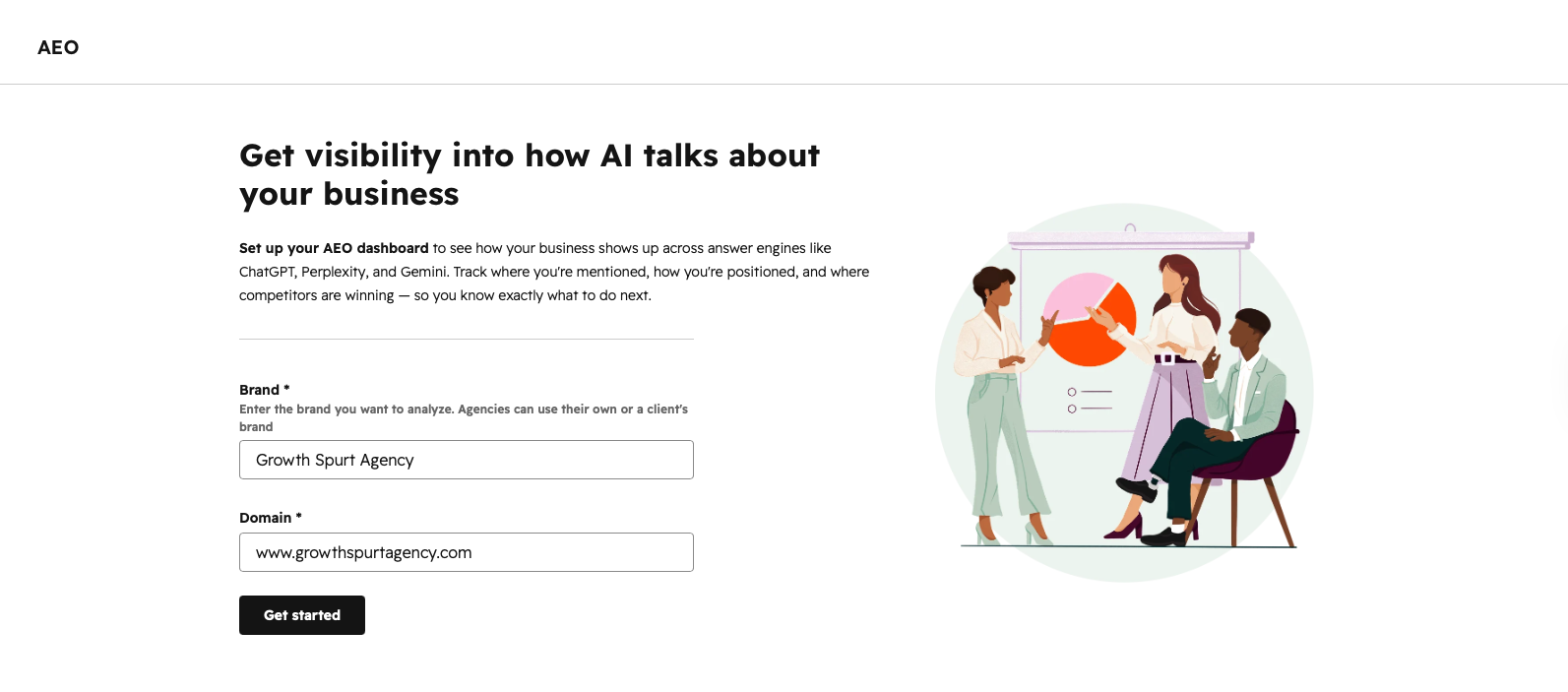
Step 1: Navigate to the AEO Tool
Inside HubSpot, navigate to:
Marketing > AEO
From there, you’ll enter:
- Your brand name
- Your website domain
This gives HubSpot the foundation it needs to begin analyzing your AI visibility.
 Step 2: Add Brand Variations
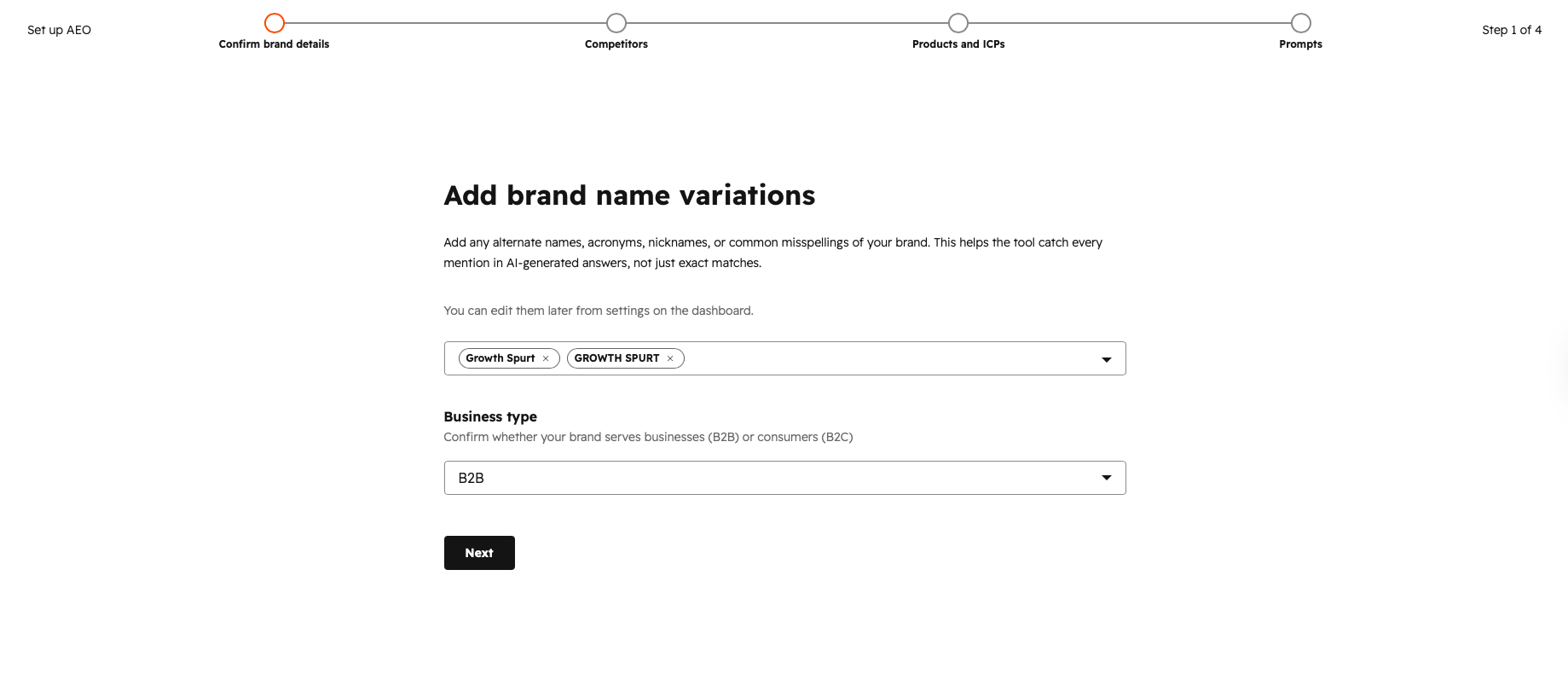
Next, HubSpot will ask you to define any alternate versions of your brand name.
This can include:
- Acronyms
- Alternate spellings
- Common misspellings
- Shortened versions of your company name
You’ll also select whether your company is:
- B2B
- B2C
This helps HubSpot better understand how and where your brand may appear in AI-generated responses.
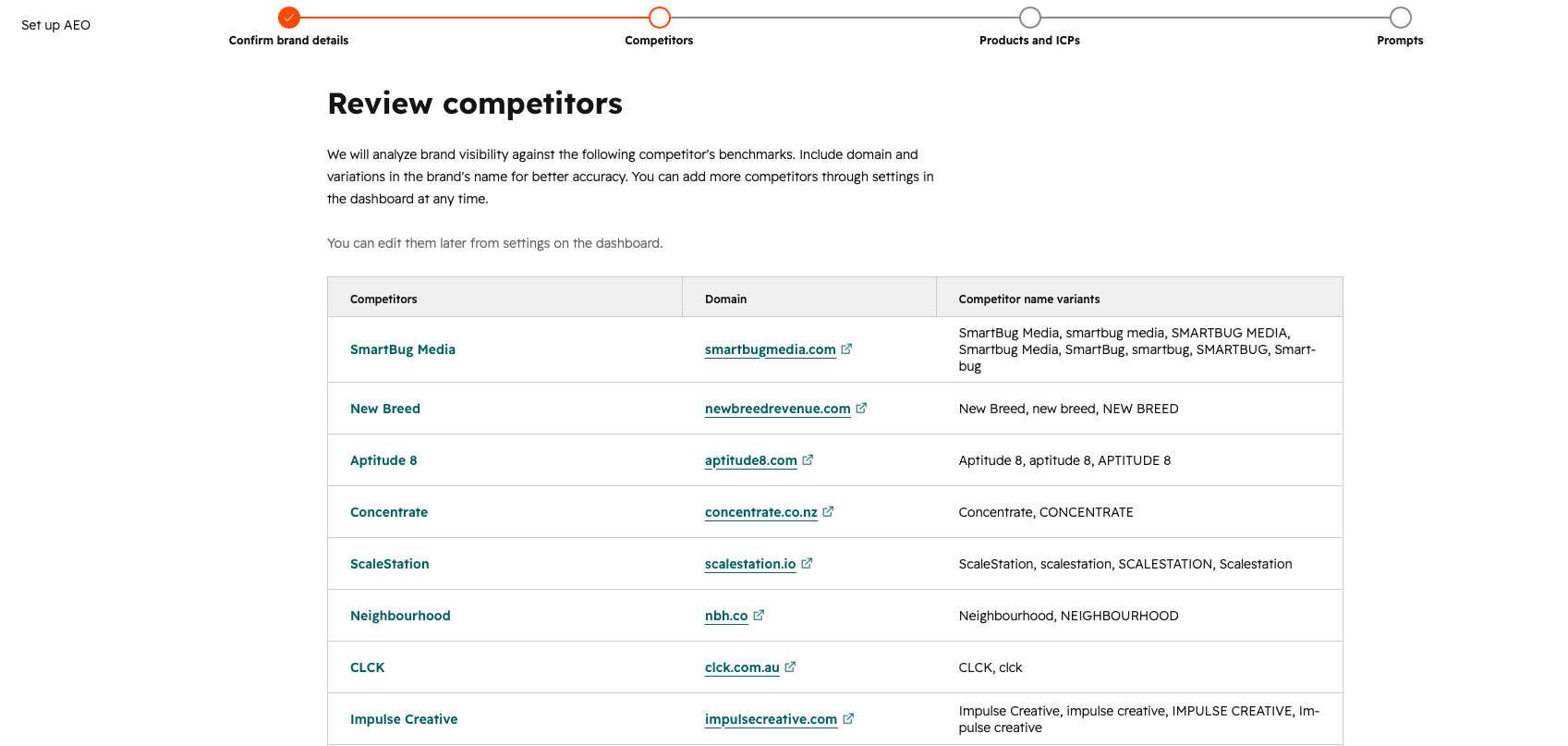
Step 3: Review Your Competitors
HubSpot will automatically suggest a list of competitors based on your industry and brand positioning.
The nice part is that this list is fully editable:
- Remove competitors that aren’t relevant
- Add additional competitors
- Update the list later inside your AEO settings
This comparison data helps HubSpot benchmark your AI visibility against other brands in your space.
Step 4: Define Products and ICPs
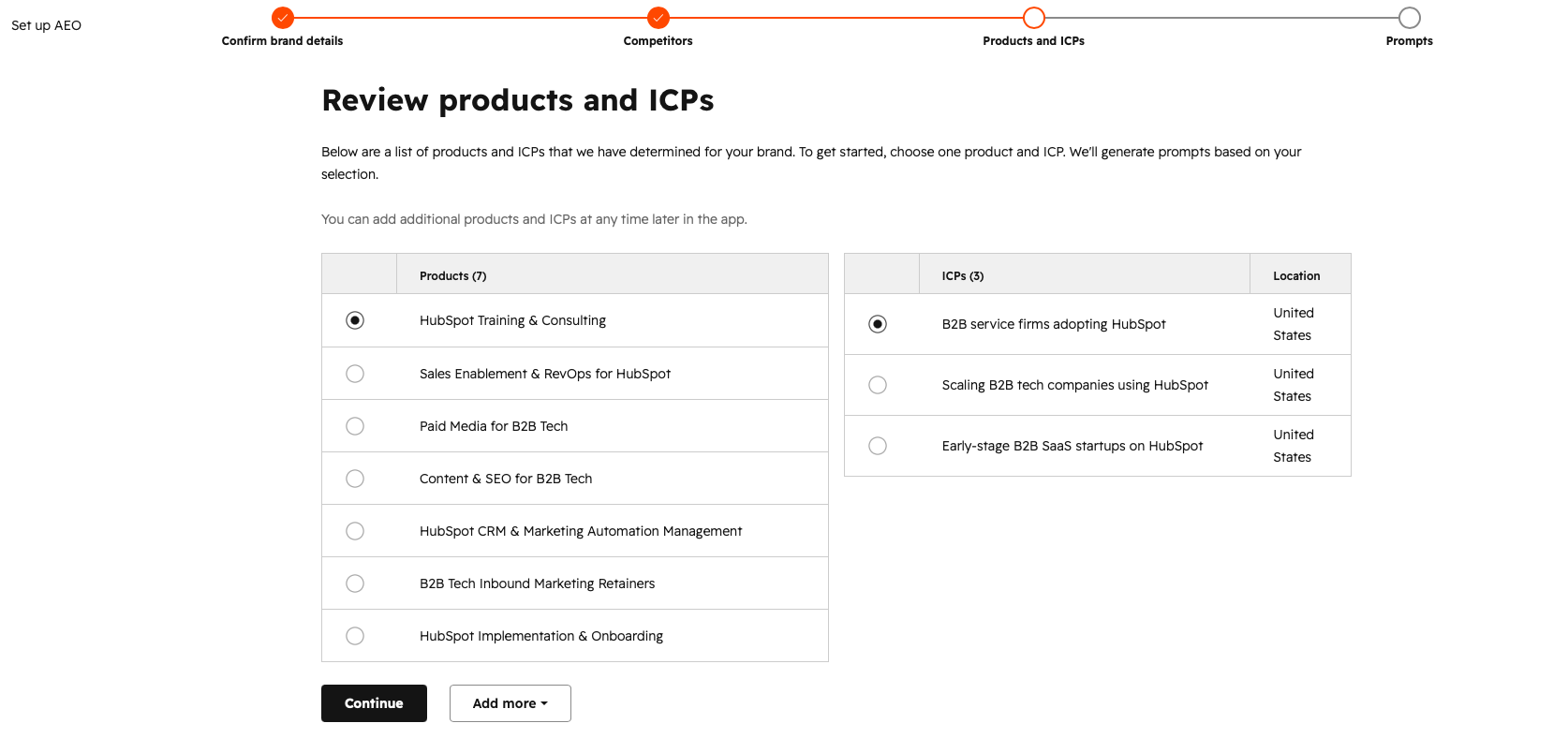
Next, HubSpot will suggest:
- Products or services
- ICPs (Ideal Customer Profiles)
You can:
- Edit the suggestions
- Add additional audiences
- Narrow them by location or market
- Refine the terminology used
This step is important because it influences the prompts and AI searches HubSpot will monitor later.
Step 5: Review AI Prompts
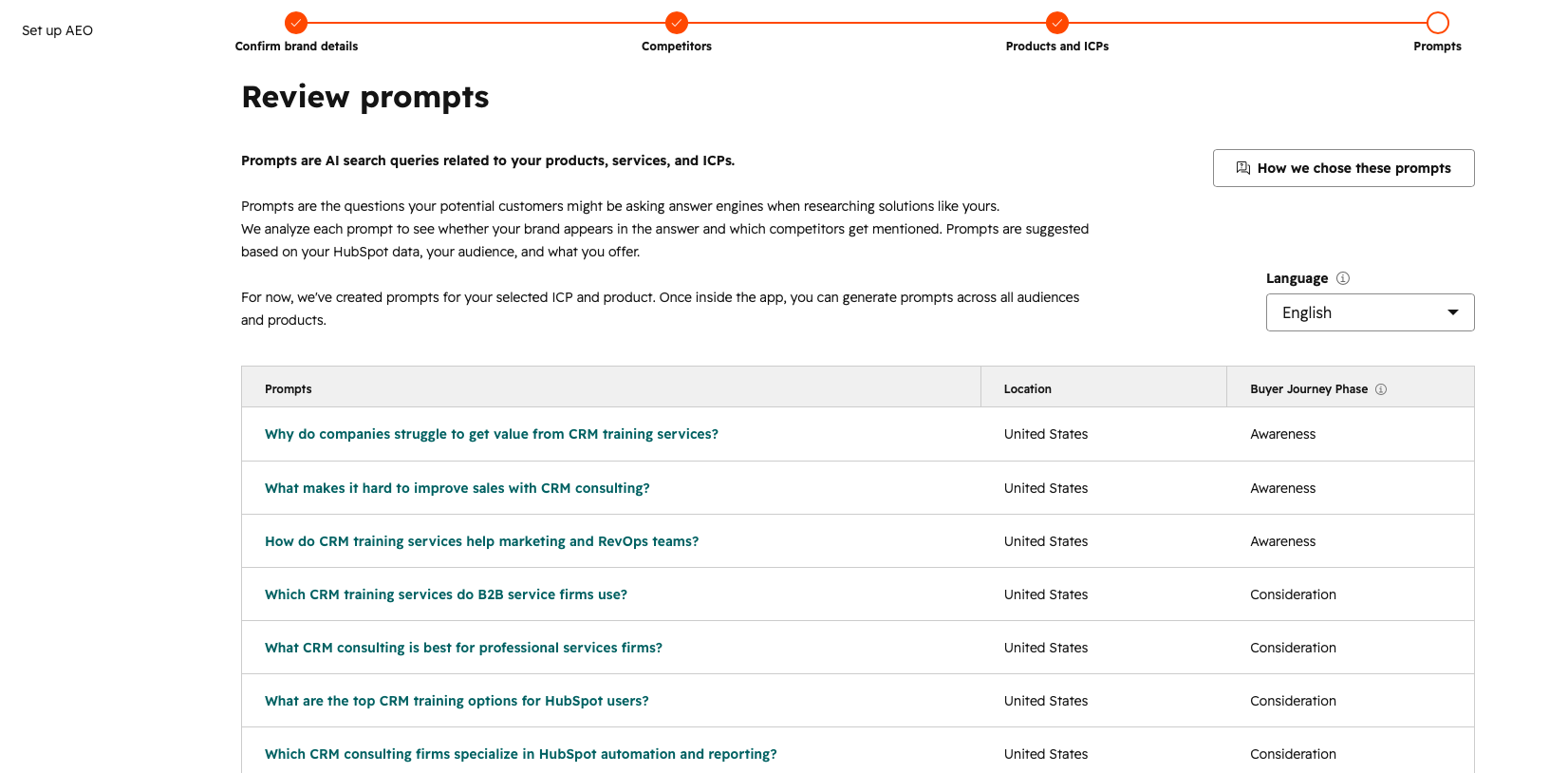
HubSpot will then generate suggested prompts based on your:
- Products
- Services
- ICPs
These prompts represent the kinds of searches people may ask AI tools like ChatGPT or Gemini.
Examples might include:
- “Best CRM for manufacturers”
- “Top cybersecurity solutions for healthcare”
- “Best inbound marketing agency in Boston”
You can fully edit these prompts now or later inside the platform.
HubSpot also allows you to generate prompts across all products and audiences to expand your tracking coverage.
Step 6: Let HubSpot Analyze Your AI Visibility
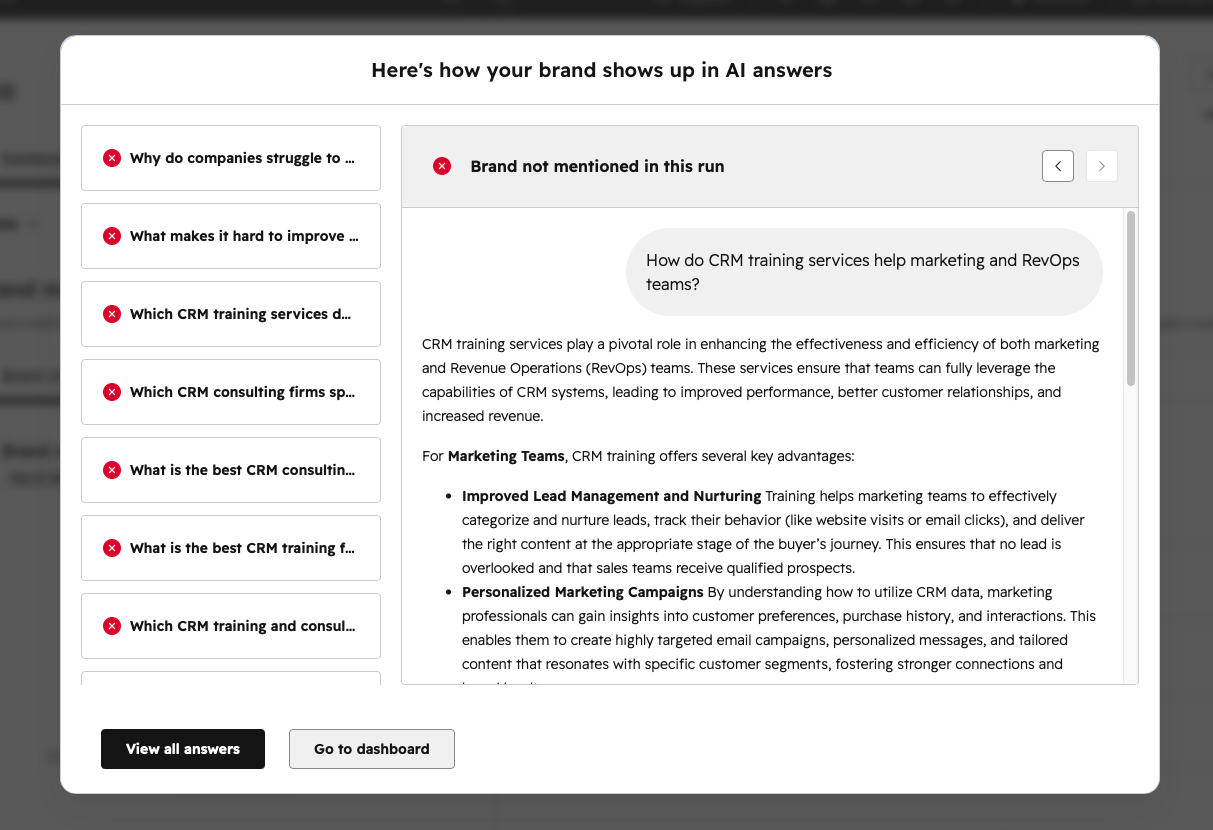
Once setup is complete, HubSpot evaluates your prompts against the major generative AI engines driving search traffic today:
- ChatGPT & SearchGPT (OpenAI)
- Google AI Overviews & Gemini
- Perplexity AI
- Claude (Anthropic)
The tool measures whether your brand appears, your share of voice against named competitors, sentiment analysis (positive, neutral, negative framing), and the exact source URL citations driving the LLM's response.
Understanding the HubSpot AEO Dashboard
Once you’re fully set up, you’ll gain access to several key areas inside the platform.
Dashboard Tab
The Dashboard gives you a high-level overview of:
- Brand visibility metrics
- Competitor landscape
- Citation analysis
- Overall AI search performance
This is usually the best starting point for monitoring trends over time.
Prompts Tab
The Prompts tab lets you:
- Review tracked AI prompts
- See current AI-generated answers
- Identify where your brand appears
- Get recommendations for content opportunities
This section is especially useful for identifying gaps in your content strategy.
Citations Tab
The Citations tab focuses on:
- Citation performance vs competitors
- Citation composition
- Top-performing citation sources
This helps you understand which websites and content sources are influencing AI-generated answers.
Recommendations Tab
The Recommendations tab organizes actionable next steps for your team.
Recommendations include:
- Suggested content titles
- Recommendation type
- Content type
- Marketing channel
- Priority level
- Status
- Assignee
- Creation date
This is where HubSpot starts turning AI visibility insights into an actual content roadmap.
Is AEO Replacing SEO?
Not exactly.
Traditional SEO still matters. But the way people discover brands online is expanding beyond search results pages.
Many marketers are starting to think about:
- SEO = ranking in search engines
- AEO = being included in AI answers
The good news? A lot of strong SEO fundamentals still help with AEO too:
- Helpful content
- Clear expertise
- Strong brand positioning
- Structured pages
- Consistent publishing
Industry conversations around AEO are also emphasizing the importance of authoritative content, clear answers, and real expertise.
3 Tactical Rules for AEO-Friendly Content in HubSpot:
- Answer Questions in the First 100 Words: LLMs prioritize clear, concise, direct definitions at the top of a page before diving into nuance.
- Use Clear Heading Hierarchies & Bulleted Summaries: Structure your H2s and H3s as natural language queries (for example, "How much does X cost?") followed immediately by structured lists or tables.
- Publish First-Party Data & Expert Quotes: AI engines synthesize existing web data—they cite unique stats, original research, and distinct expert perspectives rather than rehashed general knowledge.
Want a Deeper Dive?
We also covered the bigger shift from traditional search to AI-driven discovery in this post:
From SEO to AEO: What’s Changing in Search (and What Still Matters)
Final Thoughts
AEO is still new, but it’s quickly becoming part of the modern marketing conversation — especially for teams already investing heavily in content and inbound marketing.
If you’re already using HubSpot, now’s a great time to start exploring how your brand appears in AI-generated answers and where new opportunities exist.
At the very least, try the grader and see where you stand:
Check Your Visibility with HubSpot’s AEO Grader